




Part 6

Reports and connections

What each day came to, and how Bill&Go talks to Telegram, DailyBrew, BasilBook and your own systems.

6.1Read the dashboard

Today’s sales and orders at a glance, what needs a hand, best sellers and what is running low.

Who
Owner, managers and staff
Where
Console → Dashboard

The dashboard opens on today. Change the days at the top: Today, This month, Last month, Last 7 days, Last 30 days, or Choose dates…
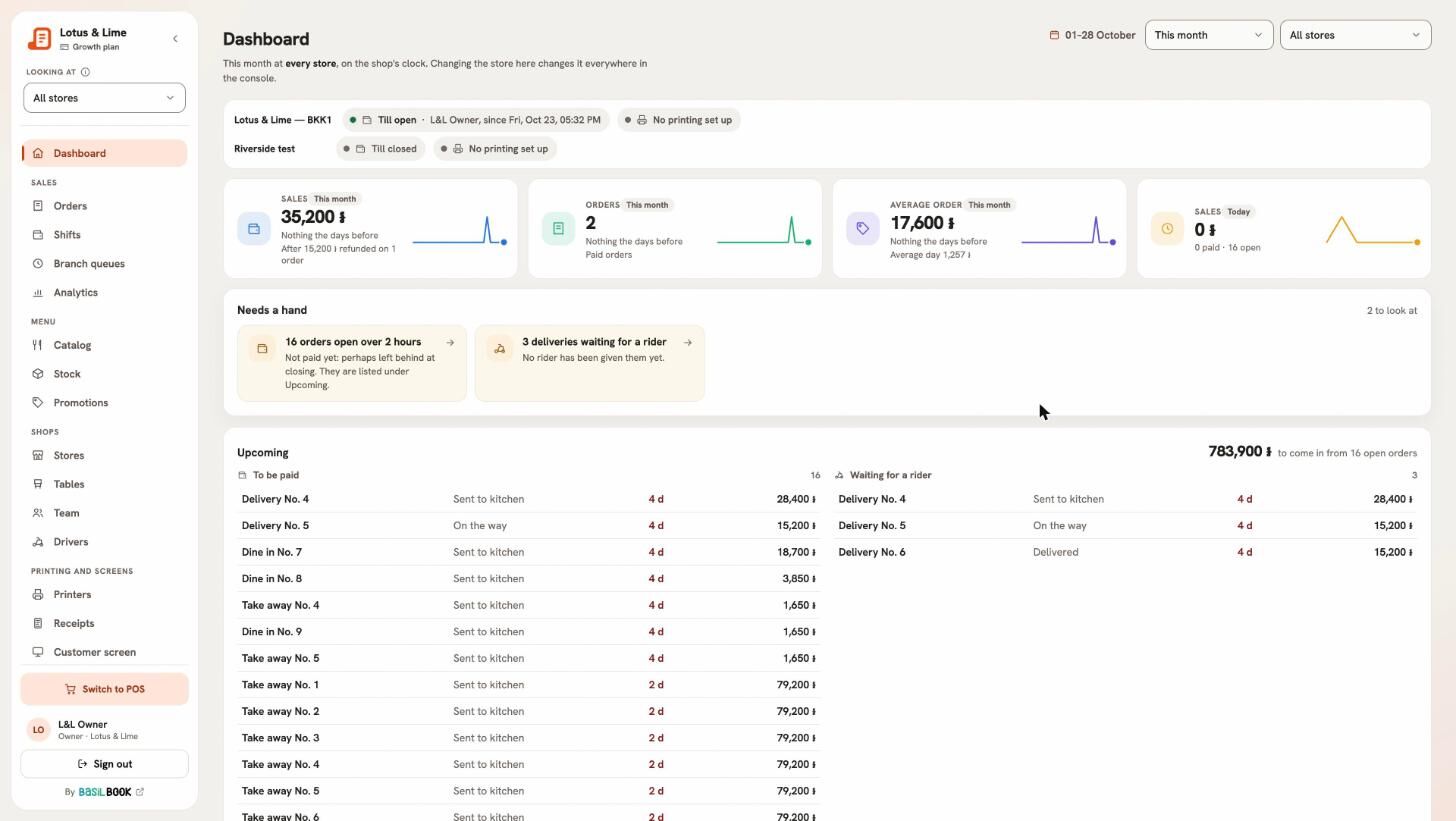
The console dashboard with sales, orders, average order and today’s sales, Needs a hand, In progress, sales day by day, best sellers and payment methods
The dashboard for this month.Full size
  • The tiles: Sales, Orders, Average order, Open orders and Paid orders.
  • Needs a hand: orders waiting for someone.
  • Sales hour by hour for one day, or Sales day by day.
  • Best sellers, Best-selling categories and Payment methods.
  • Busy hours, Recent shifts, Running low and Latest orders.

Refunds are taken off the sales and said under them.

Tip. With more than one store, pick one in Looking at to see just that branch.
6.2Check a shift

See who had the POS, what it took, and whether the drawer counted right.

Who
Owner, managers and staff
Where
Console → Shifts
  1. Open Shifts and pick the days with From and To.
  2. Each line shows when it Opened and Closed, the store, Who had it, its Sales and whether the Drawer was right.
  3. Click a shift for its report.
  • Takings: sales by payment method.
  • Delivery apps: each channel’s sales, commission and what the shop kept.
  • The drawer: per money, what should have been there and what was counted.
  • Who rang it up: each person’s sales.

Tip. Press Print again on a closed shift to print its summary.

6.3Sales charts and busy hours

Analytics shows when you are busy, what sells, how people pay and what deals gave away.

Who
Owner and managers
Where
Console → Analytics

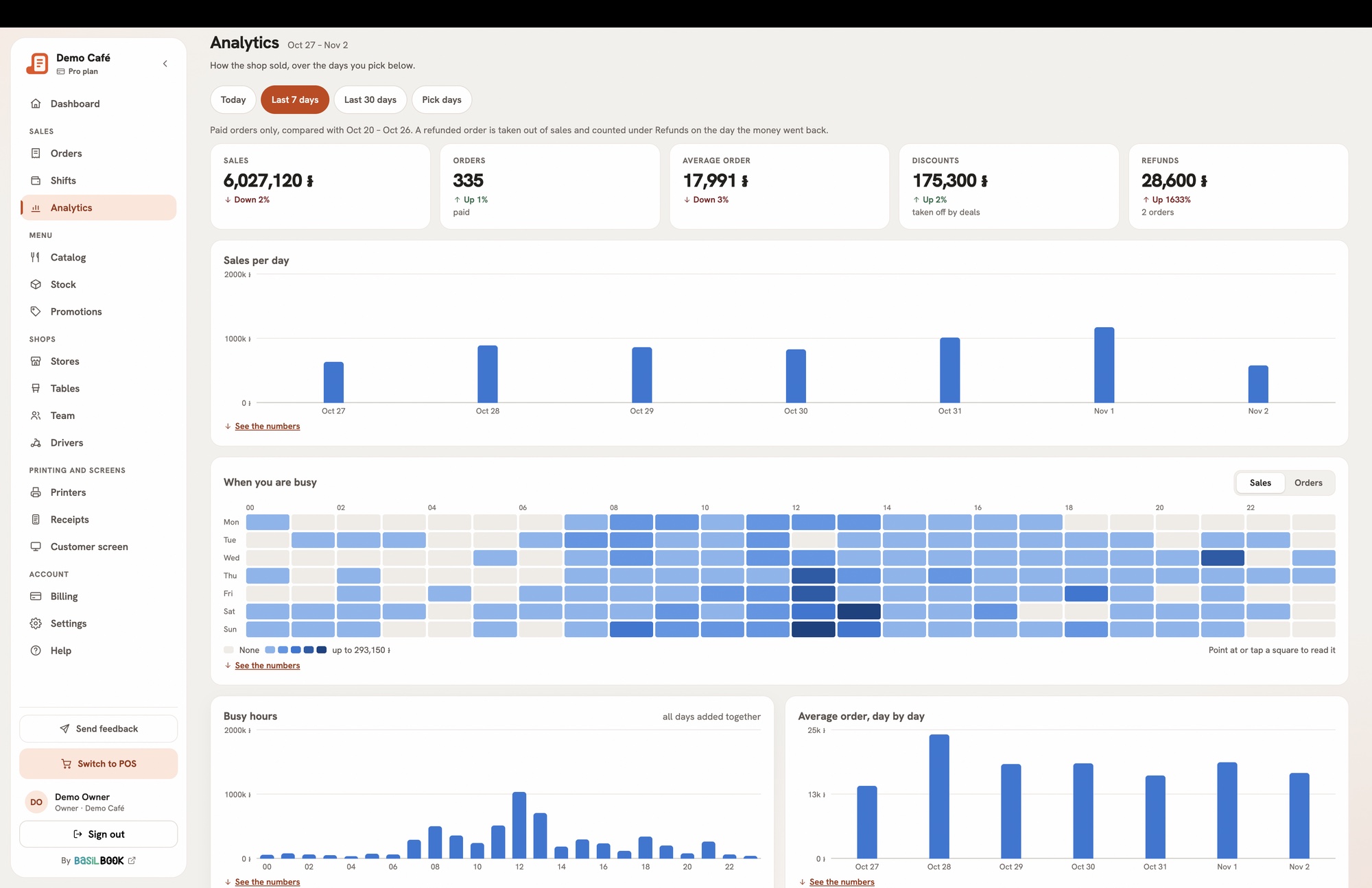
Pick the days (Today, Last 7 days, Last 30 days or Pick days) and Which money to show.

  • Sales per day, and a calendar of the days.
  • When you are busy: hours and weekdays as squares, darker when busier.
  • Best sellers by takings and by count, and by category.
  • How people paid, how orders went out, and deliveries by channel.
  • Who rang it up, what the deals gave away, refunds and voids by reason, and tables.
Analytics for the last 7 days: sales, orders, average order, discounts and refunds, sales per day and the busy hours as squares
Analytics for the last 7 days.Full size

Good to know. Analytics comes with Starter and above.

6.4Get sales and reports in Telegram

Post each sale to a Telegram group, and send the managers the day’s report and every shift handover.

Who
The owner
Where
Console → Stores → the store → Telegram

A store can link two Telegram groups:

  • Sales group — each paid sale and refund is posted here.
  • Managers’ group — the day’s report at midnight, each shift’s handover, and figures when asked.
  1. Open the store’s Telegram tab and press Link a group on the one you want.
  2. Press Add @… to a group and pick the group. Or send the /link code shown in the group yourself.
  3. The card says Waiting for the group…, then shows the group’s name.
  4. Press Send a test message to check.

Ask for the figures

In the managers’ group, send /total for the takings so far today, or /summary for the same in full. Add a day, like /total 15/10, or two days for a run of days. Buttons under the answer change it to yesterday, this week, this month or a day you pick.

Post sales to the group off keeps the group linked but quiet. Unlink takes it off.

Good to know. Telegram comes with Starter and above. A connection keeps working if you move to a smaller plan.

6.5Staff hours from DailyBrew

Connect DailyBrew, and Analytics shows each person’s days, hours and late arrivals beside what they sold.

Who
The owner connects it; owner and managers read it
Where
Console → Settings → DailyBrew; Console app → Manage → Settings

Bill&Go has no clock-in of its own. If your team checks in with DailyBrew, Bill&Go reads those hours and shows them beside each person’s sales. DailyBrew stays the one record: a fix made there shows here too.

  1. In DailyBrew, make a key under Settings.
  2. In Bill&Go, open Settings, paste the key under DailyBrew and press Connect DailyBrew. A key DailyBrew refuses is not kept.
  3. Open Analytics and find Hours and sales by person.
  4. People are matched by username. For anyone listed as not matched, press Who is this? and pick them from your team.

Paste a new key replaces the key, and Disconnect stops it.

Good to know. The connection comes with Starter and above. The POS never shows these hours.

6.6Send paid orders to BasilBook

Every paid order goes to your BasilBook books as a sale, and a refund takes it off again.

Who
The owner
Where
Console → Stores → the store → BasilBook
  1. In BasilBook, make a key under Settings → Integrations → POS push API.
  2. In Bill&Go, open the store’s BasilBook tab and paste the Key ID (it starts with bbk_) and the Secret.
  3. Set an Order number prefix, so these orders are easy to spot in your books.
  4. Switch on Send paid orders to BasilBook and press Save.

Orders paid from then on reach BasilBook within about a minute. If some are not taken, the tab says so, with See why and Send them again.

Good to know. BasilBook’s main money must be the same as the store’s price money. The connection comes with Starter and above. More about BasilBook.

6.7Connect another system with the shop API

Make an API key for your website, accounting or a delivery partner, and revoke it any time.

Who
The owner
Where
Console → Settings → API keys
  1. Open Settings, then the API keys tab, and press Add API key.
  2. Give it a Name, like “Website”.
  3. Choose What it can do: Read, or Read and place orders. Orders it places wait at the POS to be accepted.
  4. With more than one store, choose Which stores it may use.
  5. Copy the key straight away — it is shown once — and press Done.

Each key shows when it was last used. Revoke stops it at once. Give your developer the Shop API reference.

Good to know. Keep the key on a server, never in a web page or a phone app. The shop API comes with Starter and above.

Still stuck?

Tell the Bill&Go team in Phnom Penh what you were trying to do, and we'll walk you through it.

Talk to us