




Every shop in your group, from head office.
For a franchise or a family of shops: send one menu, prices and deals to every shop, see their sales beside yours, and send tasks to their stores. Each shop stays its own business, with its own data, plan and bill.
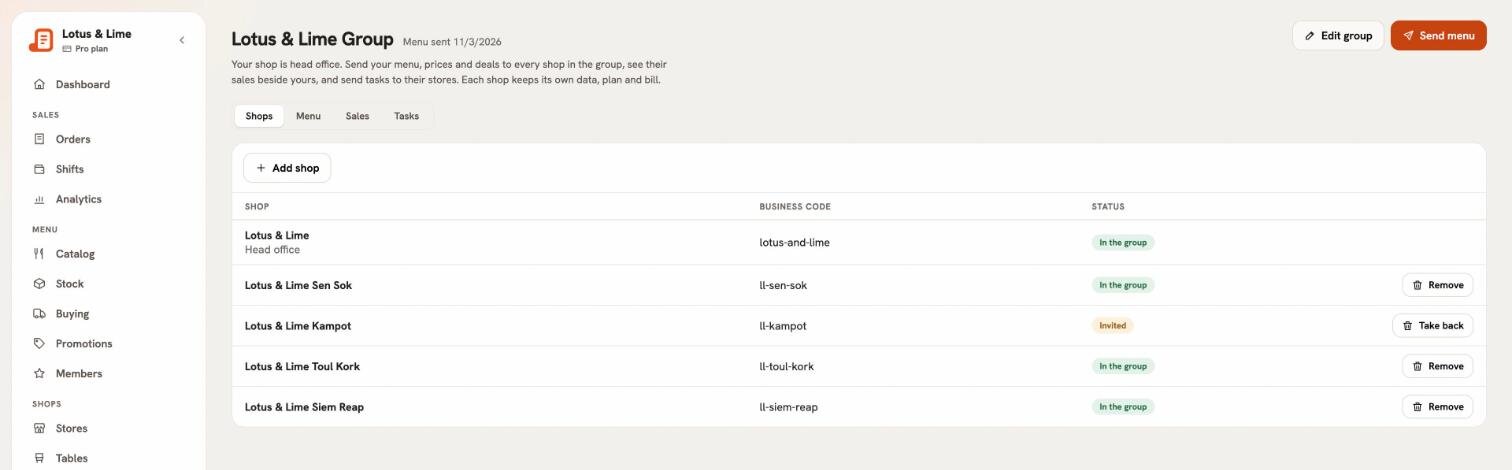
Each shop stays its own business.
Head office sends and sees what a group needs. Everything else stays with the shop.
- Its own businessEach shop keeps its own orders, staff, stock and reports. Its POS and receipts read only its own.
- Its own plan and billEach shop pays for its own Bill&Go. Franchise mode is head office’s alone.
- It joins when it says yesYou invite a shop by its business code. Its owner hears by email and accepts or turns it down.
- It can leaveA shop that leaves keeps the menu you sent, as its own.
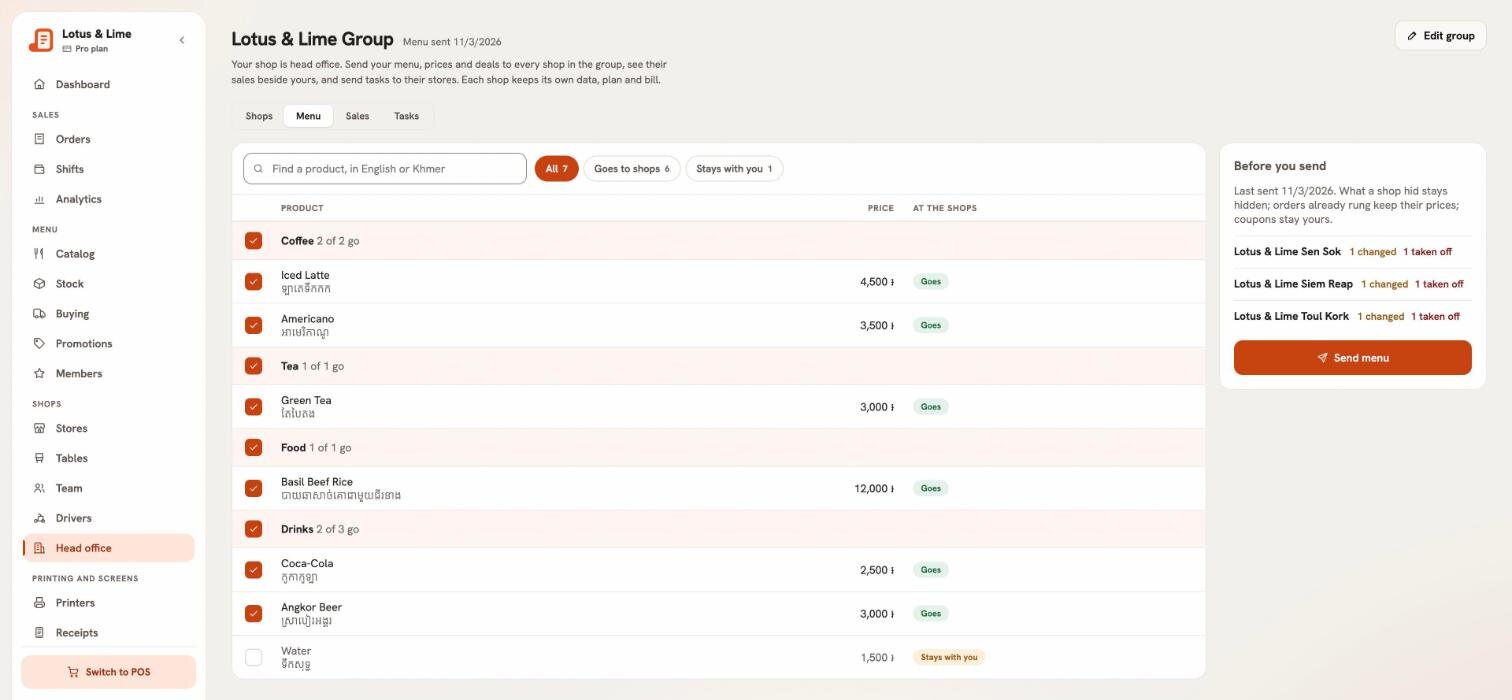
One menu, sent to every shop.
Send your categories, products with their packs, choices and prices, and your deals to every shop in the group. Tick what goes; what you leave unticked stays with you. Before you send, see what it adds, changes and takes off at each shop.
- Sending again updates the copies, adds what is new and takes off what you removed
- A price change reaches new orders; orders already rung keep theirs
- A shop in another money, or at its plan’s product limit, is skipped and told why
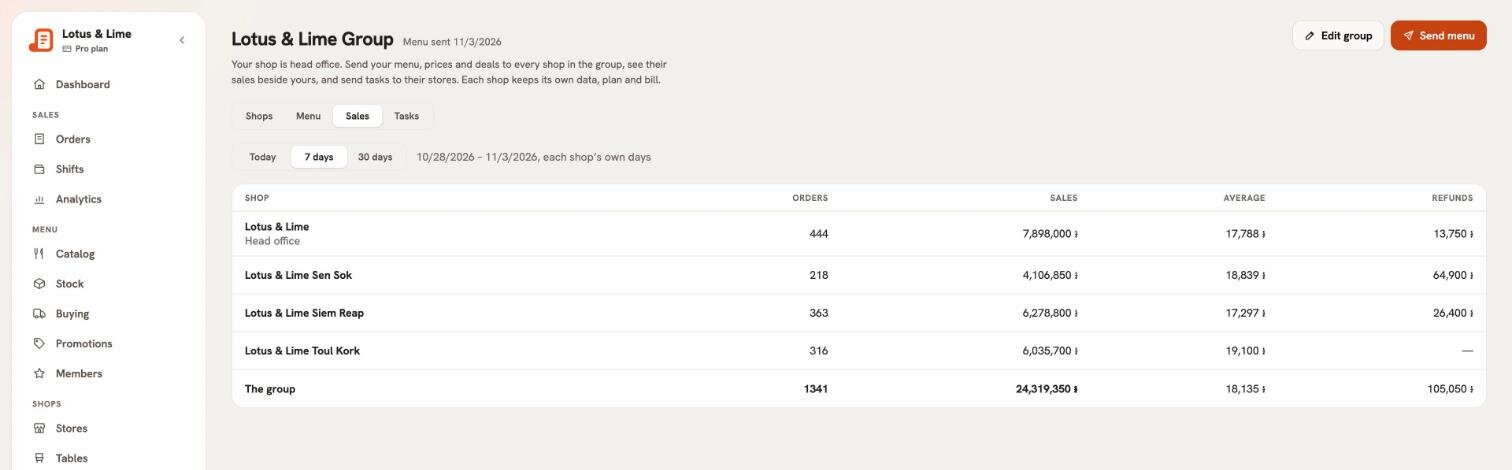
Every shop’s sales, beside yours.
Paid orders, sales, the average order and refunds for each shop, and the whole group’s total: today, the last 7 days or the last 30.
- Counted over each shop’s own days
- Totals per money
- Only totals: never a shop’s orders or customers
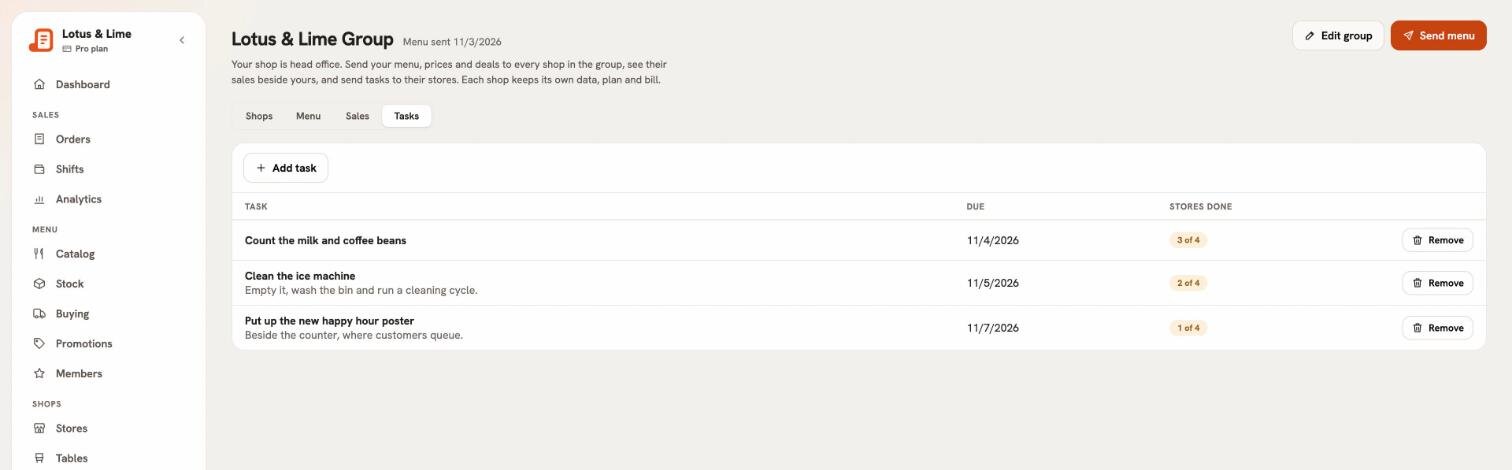
Tasks for every store.
Add a task, such as “Clean the ice machine”, with a note and a due day. It goes to every store of every shop, and you see which stores have done it.
- Anyone who works at the store marks it done, or not done again
- Each shop sees its own stores’ tasks
- Remove a task once it is no longer needed
Coming soon: tasks in the POS and the Bill&Go Console app, with a notification when head office sends one.
Shops join by their business code.
Invite a shop with the code it signs in with. Its owner accepts or turns it down on their own Head office page, and you hear back by email.
- Take an invitation back, or take a shop out
- A shop is in one group at a time
- Rename your group, or close it: every shop keeps what you sent
A shop may narrow what you send, never change it.
The same rule as branches: a shop can sell less of your menu, never a different one. What it narrowed stays put the next time you send.
| A shop may… | Allowed |
|---|---|
| Hide a product, or switch a deal off | Yes |
| Sell it at fewer of its stores | Yes |
| Count its stock and set its own cost | Yes |
| Rename or reprice it | No |
| Change its packs or choices | No |
| Change a deal’s amount, days or products | No |
Start your group in four steps.
- Switch on Franchise modeIn the web console, open Billing. Your shop is on Growth or Pro.
- Name your groupYour shop becomes its head office, and its own stores sit in the group like any other shop.
- Invite your shopsBy each shop’s business code. Its owner says yes in their own console.
- Send your menuChoose what goes, check what it changes at each shop, and send.
Franchise mode
$49.99 a month
- 3 shops included
- $9.99 a month for each shop past 3
- Paid yearly: $41.66 a month, and $8.33 a month for each shop past 3
- Added to a shop on Growth or Pro
Switched on by head office in Billing in the web console. The shops in your group pay only for their own plan.
One business with several branches? How branches work
Questions from franchises and groups.
Ask the Bill&Go team in Phnom Penh and we'll answer it.
Get in touchWhat is Franchise mode?
Franchise mode lets one shop run a group of shops, such as a franchise or a family of businesses, as their head office. Head office sends its menu, prices and deals to every shop in the group, sees each shop’s sales beside its own, and sends tasks to their stores. Each shop stays its own business, with its own data, plan and bill.
How much does Franchise mode cost?
$49.99 a month for head office, with 3 shops included, then $9.99 a month for each shop past 3. Paid yearly, it is ten months for the year: $41.66 a month, and $8.33 a month for each shop past 3. It is added to a shop on Growth or Pro, and switched on in Billing in the web console.
Is Franchise mode the same as having branches?
No. Branches are one business with several stores: one menu, one team and one bill. Franchise mode is for shops that are each their own business, with their own owner, data, plan and bill, run together from a head office.
How does a shop join the group?
Head office invites it by its business code, the code it signs in with. The shop’s owner hears by email and accepts or turns it down in their own console. Nobody joins without saying yes, and head office hears back either way.
What can head office see of each shop?
Each shop’s name, its business code, its sales totals (paid orders, sales, the average order and refunds) and the names of its stores for tasks. Never a shop’s orders, order lines or customers.
What happens if a shop leaves?
Everything head office sent stays on its menu, as its own, and head office no longer sees its sales. A shop can leave at any time, and head office can take a shop out.
More about Bill&Go.
Bring your group onto one menu.
Tell us how many shops are in your group and how you run them today. We’ll help you set up head office and invite your first shops.
Ready to start? Create your shop
Already with us? Sign in