




Taking KHQR at the counter, into your own ABA PayWay or Bakong account
A printed QR leaves the cashier checking a phone. How a KHQR with the amount on it works, how to connect your own ABA PayWay or Bakong account, and how to test it before real money moves.
Most shops start with a printed QR on the counter. The customer scans it, types the amount, and shows the cashier a phone. It costs nothing to set up, and it leaves room for mistakes: a wrong amount, an old screenshot, or a cashier who cannot see the payment arrive.
The other way is a KHQR made for each order. The amount is already on it, the customer only confirms, and the order marks itself paid when the money is in. Bill&Go does this with QR payments. The money goes straight into the store’s own account, not through Bill&Go.
ABA PayWay or Bakong
Each store connects one of two accounts.
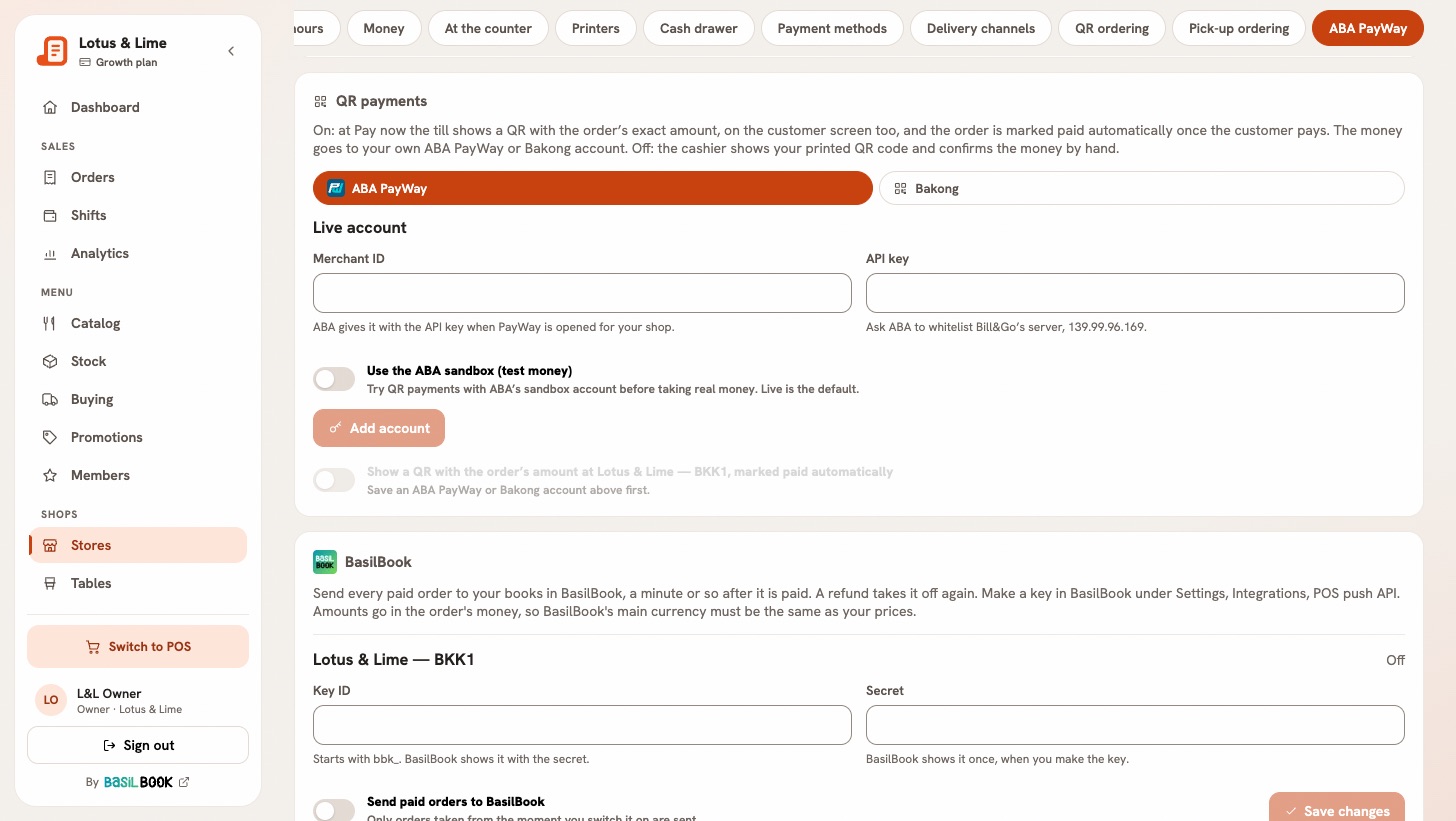
- ABA PayWay. ABA opens PayWay for your shop and gives you a merchant ID and an API key. ABA must also whitelist Bill&Go’s server; the console shows the address to give them.
- Bakong. You give your Bakong account ID, like shop@aba, which you find in your bank app under your Bakong or KHQR account. There is nothing else to ask for.
Each store has its own account, so two branches can pay into two different accounts. KHQR takes riel and US dollars only, so a store that rings in another currency cannot use it.
Connect it
- In the console, the owner opens Stores, the store, and its ABA PayWay tab. The Console app has the same under the store’s Connections.
- Under Where the money goes, pick ABA PayWay or Bakong, and fill it in.
- Press Add account.
- Switch on Show a QR with the order’s amount.
QR payments come with Starter and above, and a connection keeps working if you later move to a smaller plan. A POS left open picks up the change when it next comes to the front or opens the pay window, so nobody has to sign in again.
Test it before real money
With ABA PayWay you can try it first. Switch on Use the ABA sandbox (test money) and add the sandbox details ABA sent you. The consoles show a warning while it is on, and the POS says Sandbox: test money, not a real payment. A test sale runs like a real one and prints Test, not a sale on the bill, but it stays out of your reports, shift totals and order count. Its stock still moves, so use a dish you can correct afterward.
Switch the sandbox off before you open. It is easy to forget, so check for the warning.
At the counter
- The cashier picks the QR method in the payment window. On a new order, Show the KHQR also sends the order to the kitchen, so press it once the customer is ready to pay.
- The customer scans it with any bank app, on the POS or on the customer screen if you have one.
- The payment confirms itself, and the receipt prints.
A KHQR works for 5 minutes; New QR makes another. If the answer is late, Confirm by hand finishes the sale, once the cashier has seen the money. On a split bill, each share gets its own KHQR for its own amount.
Afterward
- QR sales are counted apart from cash in the shift report, so the drawer count is not affected.
- Money going back on a refund is sent by hand from your account: Bill&Go tells you the amount, and records the refund.
- If a QR could not be made, the store’s QR payments card says why.
Tip. Keep your printed QR near the POS anyway. If the account has a problem, switch QR payments off, and the cashier can show it and confirm the money by hand. The set-up is in Take KHQR into your own account.
Questions
Does the money from KHQR go through Bill&Go?
No. It lands in the store’s own ABA PayWay or Bakong account. Bill&Go makes or requests the QR and checks that it was paid.
Can each branch have its own KHQR account?
Yes. QR payments are set for each store, so each branch can pay into its own account.
Can I test KHQR before taking real payments?
With ABA PayWay, yes: the ABA sandbox takes test money. Those sales are marked as tests and stay out of your reports and shift totals.
Which currencies does KHQR take?
Riel and US dollars.
Still stuck?
Tell the Bill&Go team in Phnom Penh what you were trying to do, and we'll walk you through it.