




How to split a bill at the POS, without splitting the order
Four friends, one table, three ways to pay. How to split a bill equally or by item in Bill&Go, what the kitchen and the reports see, and what to do when only half the table has paid.
It happens at every busy lunch. The table asks for the bill, and one person pays in cash, one wants to scan a KHQR, and two want to pay only for what they ate. Without help, the cashier works it out on a calculator, rings it up in pieces, and the shift no longer adds up.
Bill&Go has Split the bill for this, on the web POS and in the POS app. One rule sits behind it: the order stays one order. The kitchen has already cooked it, the table is one table, and the report shows one sale. Only the money comes in pieces.
Choose how to split
Open the table’s order and press Split the bill, under Pay. There are two ways.
- Equal shares is for the table that says “let’s just split it”. Set the number of people, from 2 to 20. What does not divide goes to the first shares, so nobody has to find a coin that does not exist: 10,000៛ for three people is 3,400៛, 3,300៛ and 3,300៛.
- By item is for the table where one person had the steak and another a coffee. Tap a person and give them their items, one at a time. Give the rest to hands the last person everything left. Every item has to go to someone before you can go on.
With By item, a discount on the bill and the tax are shared in proportion to what each person took. The shares always add up to the total, and the POS works them out: nobody types an amount, so nobody can get one wrong.
Take each share its own way
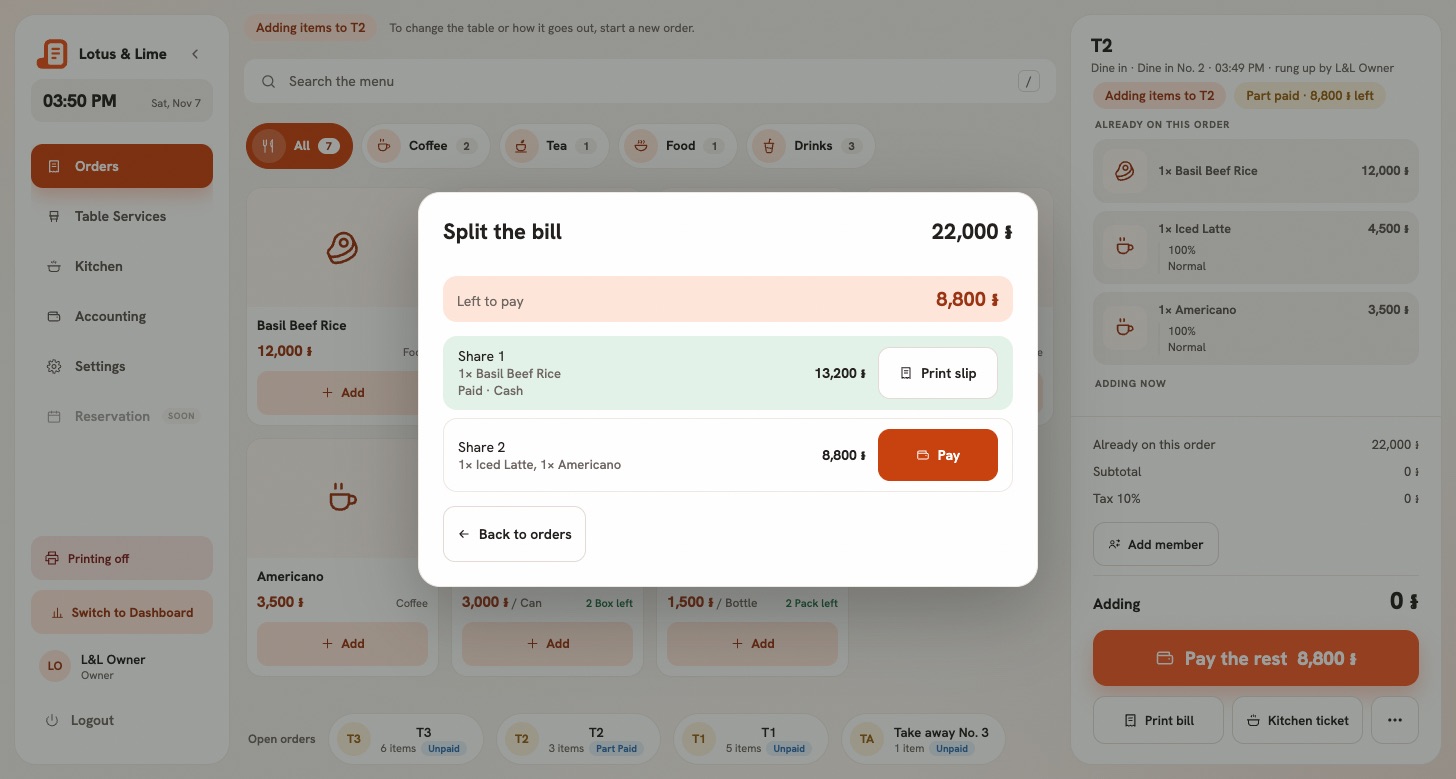
Each share has its own Pay button, and each opens the usual payment window. So one person pays in dollars and riel with the change worked out, the next scans a KHQR made for their share alone, and the third pays by card. Each share prints its own slip, and the last one prints the whole bill as well, with a line for each share.
The money lands in the shift that took it, in the method it came by, so the drawer count at closing stays right.
When only half the table has paid
People leave at different times. Until the last share is in, the order says Part paid with what is left, keeps its table and stays with the open orders. Pay the rest brings the shares back.
Once a share is paid, the bill is fixed. You cannot add a round to it, take a dish off or void it, because someone has already paid for their part of that bill. If the table orders more before anyone pays, just add it: the split is dropped, and you split the new bill. Before the first payment, Back to one bill undoes a split.
What cannot be split
- Delivery orders. A delivery is one bill, and the rider brings the money back.
- Online orders. They are paid in the app or at pick-up.
- Anything offline. Splitting needs the connection, because Bill&Go keeps the shares, so two devices cannot take the same one. Offline, a bill with nothing paid on it can still be paid whole in cash.
Refunds
A refund is always of the whole order, by the owner or a manager, and each share goes back the way it came. A part-paid order can be refunded too: what was taken goes back, and the order is canceled.
Tip. Teach this one to new staff with the table in front of them: ask how they want to pay first, then split. It is quicker than splitting and changing your mind. The steps are in Split the bill.
Questions
Can Bill&Go split a bill between several people?
Yes. On the web POS and in the POS app, Split the bill divides an open order equally between 2 and 20 people, or by item, and each share is paid its own way: cash, card, KHQR or another method.
Does splitting a bill make several orders?
No. It stays one order for the kitchen, the table and the reports. Only the payment comes in shares, and the order is paid when the last share is.
Can one person pay by KHQR and another in cash?
Yes. Each share has its own payment, and a KHQR is made for that share’s amount alone.
Still stuck?
Tell the Bill&Go team in Phnom Penh what you were trying to do, and we'll walk you through it.