


Bill&Go Rider: the first POS in Cambodia with its own delivery app for your riders
Your riders now have their own app, made for the same POS your cashiers use. What they see, what the shop sees, and how to get your first rider on the road today.
Most shops in Phnom Penh run two kinds of delivery. Grab and foodpanda bring their own riders. And then there is your own rider: the cousin with a moto, the staff member who takes the office orders down the street. Until now, that rider worked from a phone call, a photo of the bill and a Telegram message, and the cash came back whenever it came back.
Bill&Go Rider changes that. It is the first delivery app in Cambodia made for a POS: your riders see the orders your cashier rings up, as they are rung, and every step they take is seen at the POS and in the console. It is free to download today on the App Store.
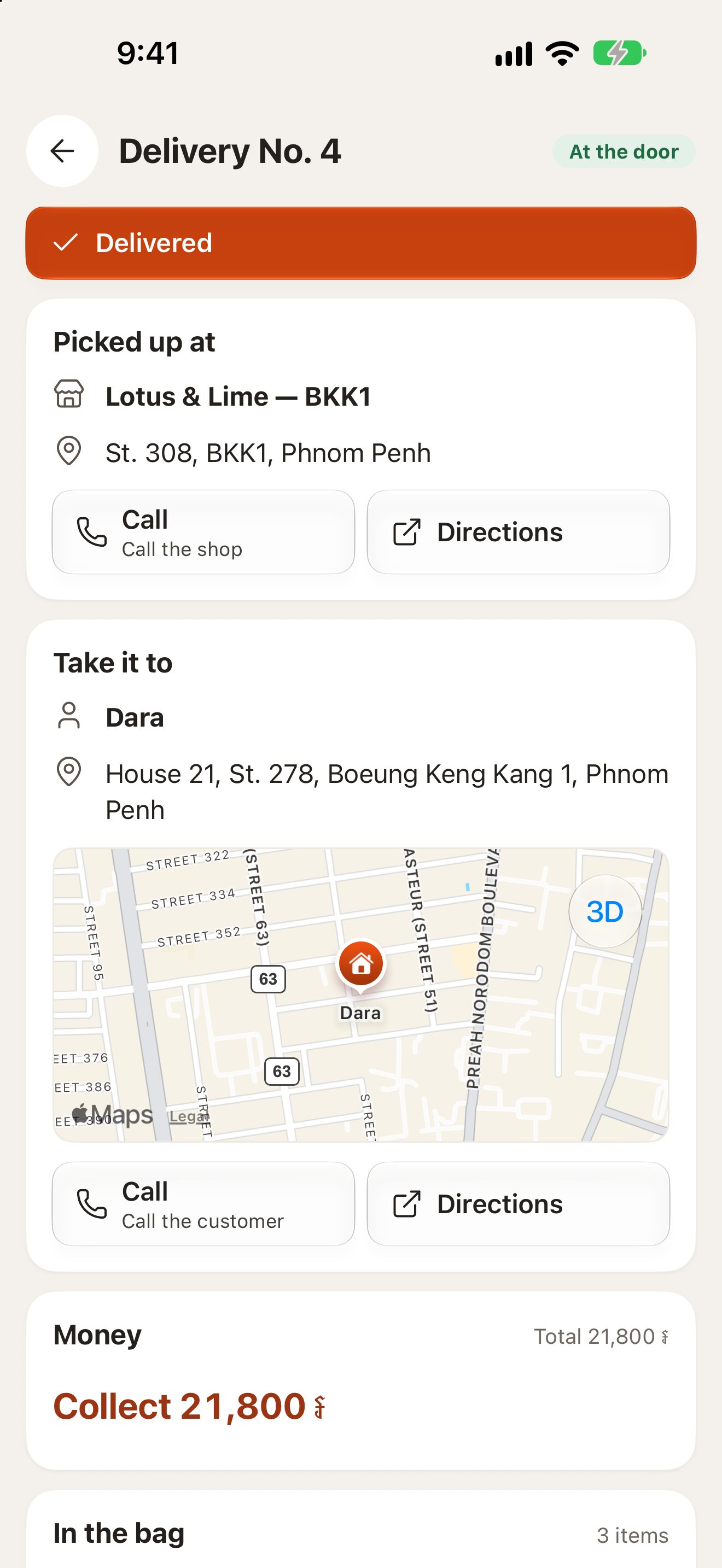
What your rider sees
- My deliveries: what is theirs to carry now, the one at the door first, then what they finished today.
- One big button for the next step: Picked up, On the way, At the door, Delivered. No menus to learn.
- Where to pick up and where to go, with the customer’s phone, the address, the note and the pin, and Directions straight into their map app. Two or more orders on one trip become stops in order, on one map.
- The money to collect, so a rider never asks the customer how much, and Cash to hand in, what they are holding until the POS takes it.
- A push when a delivery is theirs, and an Inbox of everything that happened.
- It works with a weak signal. Steps and location wait on the phone and go out in order when the connection is back.
The app is in English, French, Khmer and Chinese, so every rider reads it in their own language.
What the shop sees
At the POS, a delivery for your own rider is named for them or picked up by scanning its rider slip. While it is on the road, the rider’s location is shared from Picked up until Delivered, so the cashier can tell the customer where it is. Mark it Cash on delivery and the rider knows to collect; back at the shop, Receive from rider takes the cash into the drawer, order by order, so the shift adds up.
In the console, every delivery shows who took it and each step with its time. Delivery apps like Grab never show in Bill&Go Rider: it is only for your own riders.
Get your first rider on the road
- In the console, open Drivers and press Add driver: their name, phone and the stores they ride from.
- Give them their sign-in: a username and password, or print a sign-in badge they scan once with the phone’s camera.
- They download Bill&Go Rider from the App Store and sign in.
- At the POS, ring a delivery for Own rider, and send it out.
The owner can always ride too, with their own account. More in Delivery partners and your own riders.
Tip. Start with one rider for a day. Ask them to press each step as it happens: by the evening, you will see in the console how long each delivery really took, from the kitchen to the door.
Questions
What is Bill&Go Rider?
A free app for a shop’s own delivery riders, made for the Bill&Go POS. Riders see the deliveries the POS rings up for them, follow one button through each step, get directions, and know the cash to collect.
Do Grab or foodpanda orders show in Bill&Go Rider?
No. Those apps bring their own riders. Bill&Go Rider shows only the deliveries for your own riders.
How does the cash a rider collects get back to the shop?
The rider sees what they hold under Cash to hand in. At the POS, Receive from rider takes it into the drawer, order by order, so the shift adds up.
Still stuck?
Tell the Bill&Go team in Phnom Penh what you were trying to do, and we'll walk you through it.