




Take a payment
Take cash in dollars and riel with the change worked out, or a card, QR or other method.
- Who
- Owner, managers and staff
- Where
- Till → Pay now on a new order, or Pay on an open one
Press Pay now on a new order, or Pay on an open one. The buttons along the top are your shop’s payment methods, like Cash, QR Code and Credit/Debit Card.
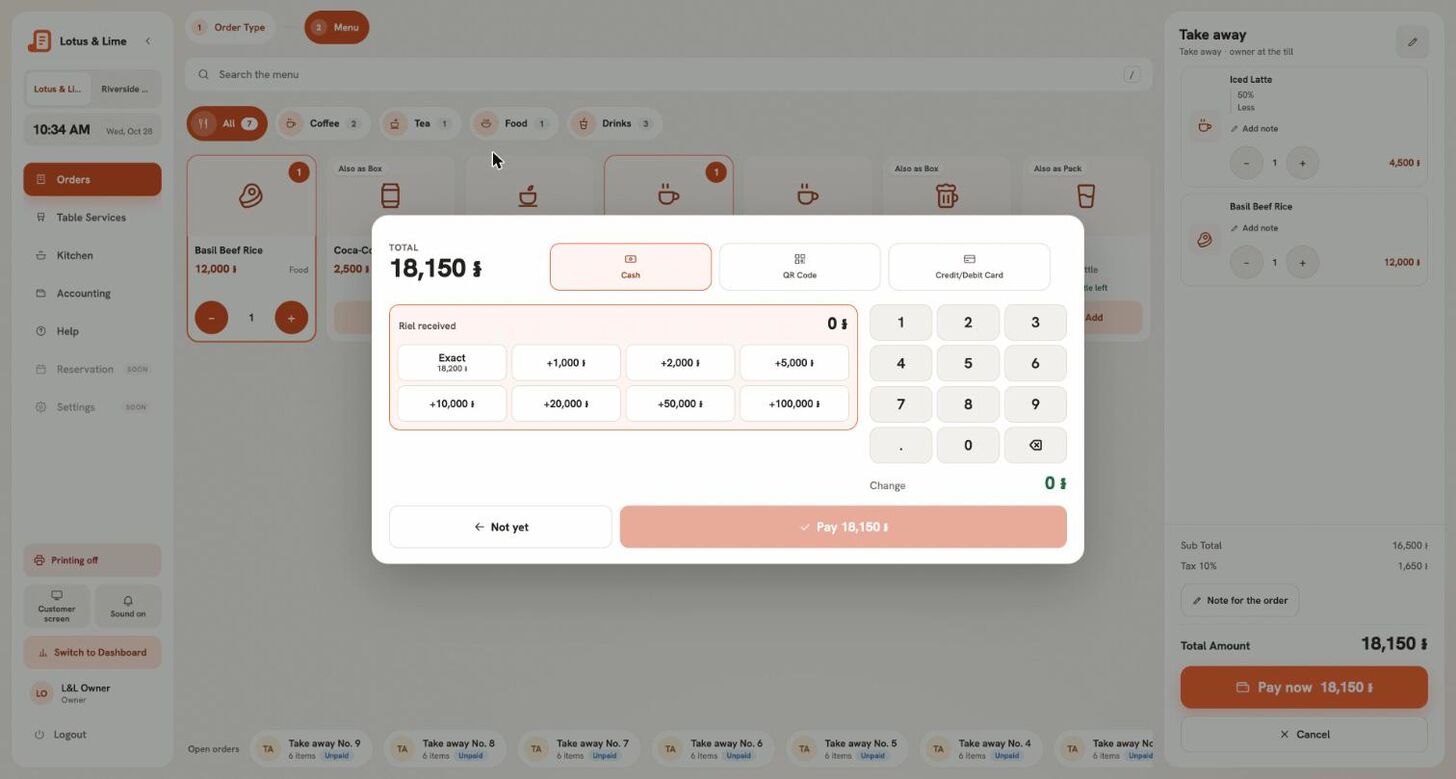
Cash
- Pick Cash. There is a row for each currency the store takes.
- Tap the notes the customer hands you, like +$10 or +10,000៛, or press Exact. Clear starts again.
- Pick how to Give change in: Dollars, Riel, or Dollars and riel. The window shows Still to pay or Change.
- Confirm. The Paid screen says what to Give back, and the receipt prints by itself.
Riel is rounded to the nearest 100, always in the customer’s favour. A customer can pay part in dollars and part in riel at the store’s rate.
Card, QR and other methods
- Pick the method. Run the card on the terminal, or let the customer pay by QR.
- Once the money is in, add the Reference on the slip if you want it, and press Pay.
Not paying yet
Not yet closes the window and nothing is taken. After Pay now on a new order, nothing is placed either.
Good to know. Paying does not always finish an order: a delivery stays open until it is delivered, and if your kitchen marks orders, until it is handed over.
Tip. Need the receipt again? Press Print bill again on the Paid screen, or Print again on the receipt later.
Still stuck?
Tell the Bill&Go team in Phnom Penh what you were trying to do, and we'll walk you through it.