




Choices: sugar, ice, sizes and add-ons
Make a modifier group, like Sugar level, with its options, extra charges and how many can be picked.
- Who
- Owner and managers
- Where
- Console → Catalog → Modifier groups → New group
- Open Catalog, the Modifier groups tab, and press New group.
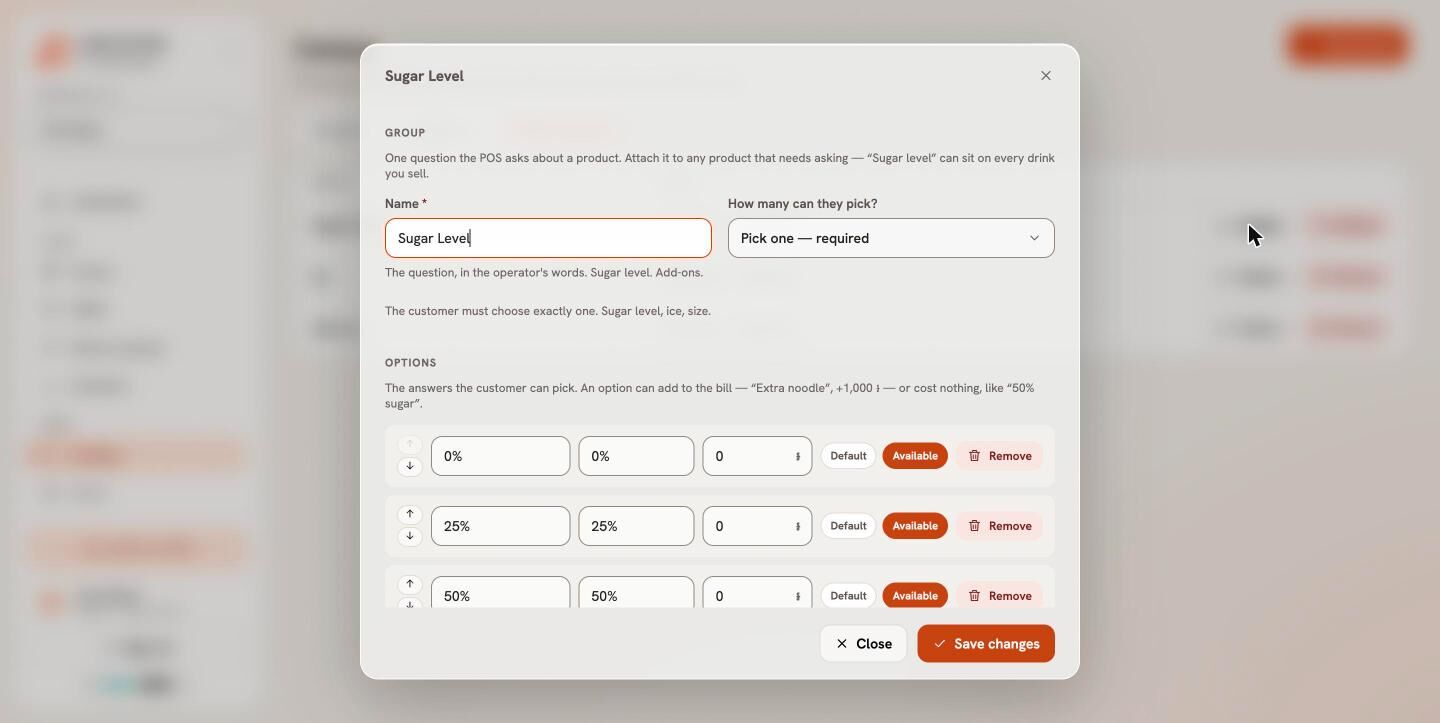
- Type the Name as the question, like “Sugar level”.
- Choose How many can they pick?: Pick one — required, Pick one — optional, Pick any — optional, or Custom with a Minimum and Maximum.
- Under Options, type each Option name, its Khmer name and any Extra charge (it can be less than zero, for a smaller size). Press Add option for the next one.
- Press Add group, then add the group to products on their Options tab.
At the till, the usual choice is already picked, so a normal order is one tap. A required group must be answered before the item is added, and Bill&Go checks the rules again when the order is placed.
Still stuck?
Tell the Bill&Go team in Phnom Penh what you were trying to do, and we'll walk you through it.